GSoC Project Updates, Post-Midterm
We are now past the GSoC midterm and the second phase of this project is now underway. I want to quickly share what I worked on during this first week after the midterm.
The main deliverables I covered in my proposal were (we also ended up doing other things):
“MicroPython implementation (as a shell subcommand or standalone app as per discussion with mentors) - REPL and script running support.”
This is partially complete. “script running support” is a bit vague, but we do have an interactive shell and a raw mode (more on this later) for the same, along with imports from IMFS. The scope for this can be discussed.
Full support for using RTEMS APIs through MicroPython.
Implementations of the time and machine modules rely directly on RTEMS APIs. The second phase will see more such modules, along with perhaps a separate rtems module that could be used to perform specific system tasks. This is a point of discussion as we can’t use things like GPIO, I2C in the pc686 BSP that we are using for development.
Test cases for API support.
This is what I have been working on this week. MicroPython has a test suite and runner (tests/run-tests.py) that tests the unix port by default, and can test other ports by communicating with them over a serial port.
MicroPython Test Suite
MicroPython’s tests can be run for a platform (other than the default unix port) by providing a serial port to the -t flag. We can make the serial output from our test application available at a pseudoterminal using:
qemu-system-i386 --cpu core2duo -no-reboot -append "--console=/dev/com1" -serial chardev:char0 -chardev pty,id=char0,logfile=chardev.log,signal=off -kernel build/test_app.exe
We can then run the test suite using (N is the pty number assigned to the output by qemu):
./run-tests.py -t /dev/pts/N
So this didn’t work at first, and now I’ll talk about each problem I faced.
Raw REPL
I have covered this before, but MicroPython supports a “Raw” REPL alongside the normal “friendly” REPL. There’s this problem I faced early on with serial input where calls like fgets() or getchar() wouldn’t block for input. I eventually figured out the required termios flags and calls from shell-wait-for-input.c and was able to get input working. Thing is, input is line-buffered (ICANON, “canonical input” mode) so even if I send a Ctrl+A (MicroPython’s expected sequence that makes it drop into a Raw REPL), I have to send a newline after it. Sure, I can do that, but the tools won’t. They just send Ctrl+A and start listening for the Raw REPL prompt:
raw REPL; CTRL-B to exit
>
Earlier in the first phase this wasn’t a priority (the “tool” at that point was mpremote, not the test runner), so we decided to spend more time on stuff like import, the time and machine modules.
I picked this up again this week and found some “raw mode” flags from the termios man page. These, along with changes to the “micropython” readline implementation, allow us to instantly drop into a Raw REPL. The problem here is that the “friendly” input doesn’t work very well, in that we can’t see what we are typing. Fixing this is simple enough, we can just have an if-elseif-else chain and simply print the normal characters :D
Earlier I was trying to fix everything using termios flags. I think that was a mistake.
This works nicely but I have to discuss this with my mentors because a readline function now needs access to internal state (a variable, pyexec_mode_kind stores the currently active type of REPL) to work properly.
Raw Paste Mode
With that fixed, the tool was able to send Ctrl+A and the shell would immediately change to a Raw REPL, and it was also detected, but I wasn’t seeing any characters being sent. I just saw this:
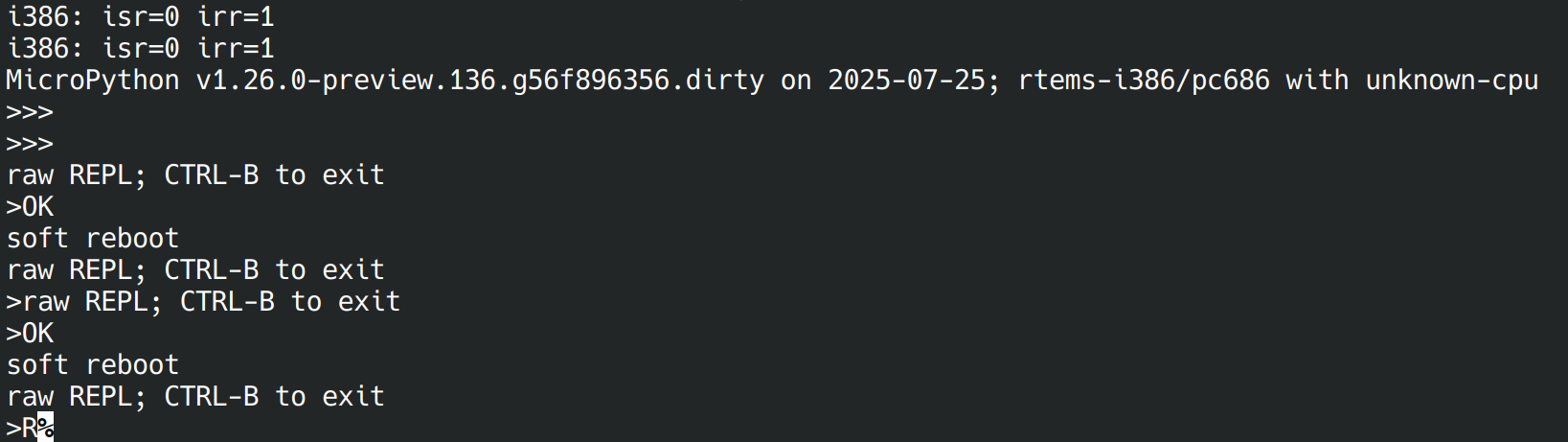
That ‘R’ at the end there means that Raw Paste Mode is supported on the port. Raw Paste mode is a mode in the MicroPython Raw REPL where bytes are sent as a sequence of fixed-size windows, terminated by Ctrl+D. As soon as the terminator is received, the sent code (bytecode) is executed and the output is displayed. We are not supposed to see the bytecode being sent, just the output so the test runner can process it.
I got the tests (well, a large subset of them) to run on the RTEMS MicroPython port by commenting out these lines that try to use Raw Paste Mode if it is available, in the helper module pyboard.py.
The output can be found here.
At first it seemed to randomly stop at certain test cases, i.e. the test runner would just freeze. I tried sequentially excluding those test groups as I ran into this problem until I got it to complete. This freezing issue is encountered with three test groups, specifically “extmod”, “micropython” and “float”. There’s quite a lot of test groups besides these that amount to 452 testcases. Out of these, the RTEMS MicroPython port passes 250 tests. There are cases that are skipped automatically because there are no “settings” right now for the RTEMS port in the test runner. It is an unidentified port and the test runner uses the “minimal” test configuration, skipping a lot of tests. Many that fail could also be irrelevant to the current scope of the port. Overall, the test runner needs an “RTEMS” configuration that, like the other ports, will specifically exclude some tests and include special tests for this port.
Other than that, the freezing issue- I haven’t been able to fix it yet, but a possible reason could be that the test case code being transmitted is longer than the size of some internal buffer which rolls over by default, so MicroPython is just waiting for more input, while the test runner is waiting for the output. This would also explain the need for a fixed-window transfer mode. Even in the friendly REPL, the input buffer size is only 32 bytes, so my test programs have to be very short.
So, a big task up ahead would be to get this Raw Paste mode working so we can run all the test cases and then start working on filtering them out and enabling/implementing more features.
Thank you for your time!